Calendar and scheduling
One schedule, not four
Appointments, open slots, field jobs, events, tasks, follow-ups and personal busy time on the same grid — because they were always the same day.
Every business tool has a calendar. What almost none of them have is one calendar that knows about all of your work at once — the booking is in the booking tool, the job is in the dispatch tool, the task is in a list somewhere, and the thing your technician actually agreed to is in their own phone.
So the schedule is never right in any of them, and someone spends their morning reconciling four pictures of one day. That is the problem this solves, and it is the reason scheduling is the most actively developed part of the platform.
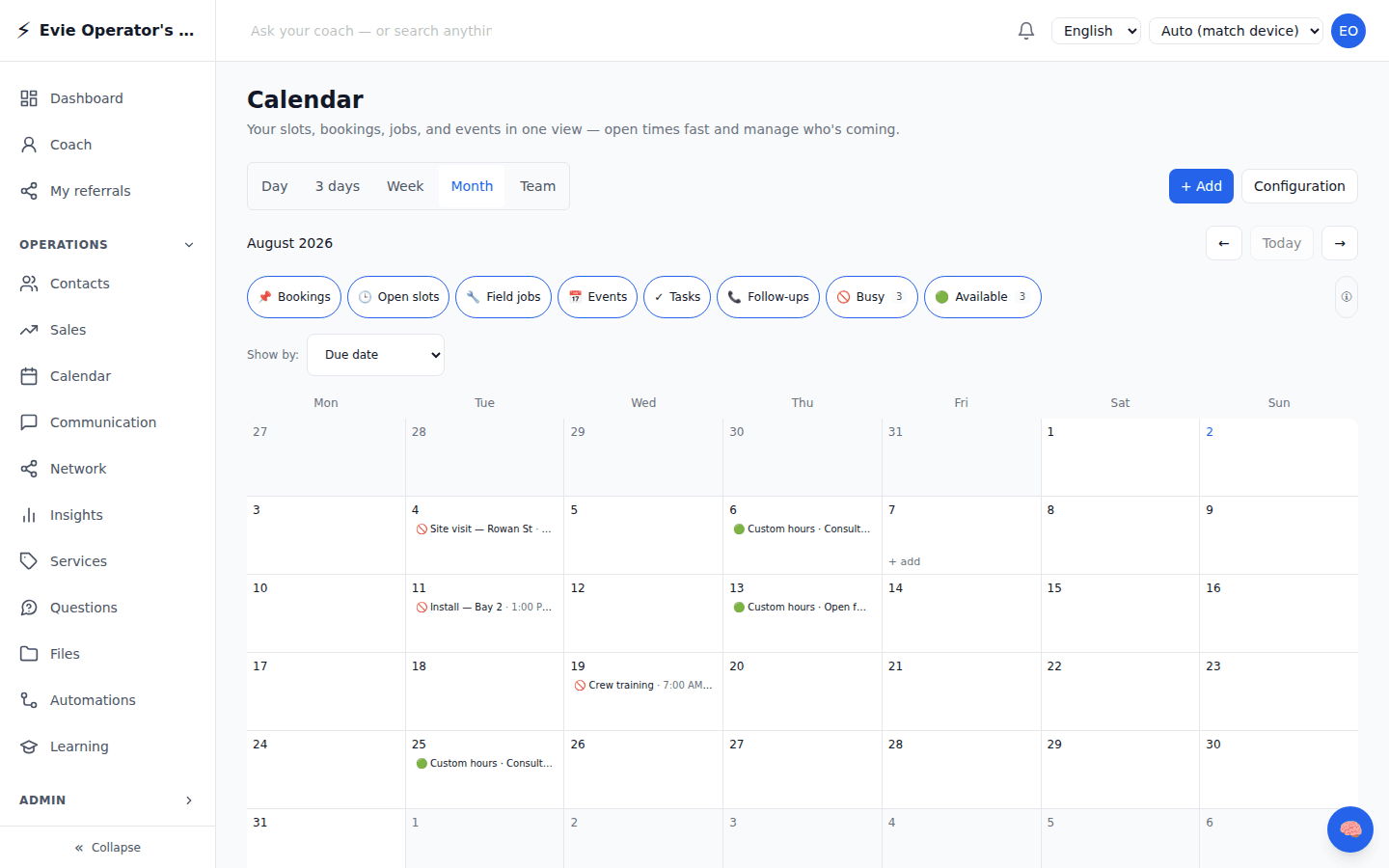
This is the actual screen
Not a mockup. A real operator account, with real blocks written through the same API your front end would call — which is why the filters read Busy 3 and Available 3: the product is counting what is genuinely there.
Eight things, one grid
Each is filterable, so the grid is as busy or as quiet as you need it to be.
Appointments
A customer booked a time. It lands on the calendar the moment they pick it, with the customer record attached.
Open slots
The bookable times you publish. Customers choose from what is genuinely free, so nothing is double-booked by a form that could not see your day.
Field jobs
Work at a place, with a crew and a window. Not a meeting — the thing a meeting-shaped calendar has always handled badly.
Events
Anything with attendees and registration, from a class to a full production, on the same grid as everything else.
Tasks
Work with a deadline but no fixed hour. Shown by due date, so what is owed this week is visible next to what is booked.
Follow-ups
The call-back you promised. The most commonly dropped commitment in any business, because it usually lives in somebody’s head.
Busy time
Real life. Blocked so the booking system never offers an hour that was never available.
Available
The opposite, and the one people forget: when you ARE free, visible at a glance instead of inferred by scanning gaps.
The double-booking you never find out about is the one the booking form could not see.
Bookable times come from what is genuinely free — after your rules, your blocked time, and whatever synced from the calendar you already use.
Four ways to look at it
Day and 3-day
What is happening now and next. The view an operator actually lives in.
Week
The planning horizon — enough to move something without losing the shape of the week.
Month
Load and pattern. Where the quiet fortnight and the impossible Thursday both become obvious.
Team
Everyone at once. Who is free, who is buried, and where the work should have gone.
The situations this is actually for
“My staff already live in their own calendar and will not switch”
Then they should not have to. Connect the calendar they already use and it syncs both ways — what is booked here shows up there, and the meeting they accepted there blocks time here. The most common reason a scheduling rollout fails is asking people to abandon a calendar that already works.
“A customer booked an hour that was never free”
Bookable times are published from what is genuinely open, minus your blocked time and minus what synced from your own calendar. The booking form cannot offer an hour the schedule does not have.
“My manager needs to see the schedule without being me”
Access to a calendar is granted, not shared by handing over a login. Someone can see and act on a schedule as themselves, and it is on the record who did what.
“The same crew, the same slot, every week”
Recurring series, with the exceptions handled properly — the holiday you skip and the one week that moves do not force you to rebuild the pattern.
“The van, the room, and the machine also have schedules”
Resources are booked like people are. The thing most tools model as a note in a description, because they only ever expected to schedule humans.
“Everyone is in a different time zone now”
Times are captured with the zone they were meant in and rendered in the reader’s. The nine-o’clock a customer picked is the nine-o’clock they meant.
What we are building right now
Scheduling is where most of our current work goes. This is honest about being in flight rather than presented as long-settled — if you are evaluating us, you should know which parts are moving.
- Two-way sync with external calendars, including the push side — a change here reaching the calendar your staff already have open.
- Click anything on the calendar to see what it is, with editing gated by permission rather than by hiding the button.
- A month cell that can be dense or compact, because a busy Thursday and a quiet one want different things from the same grid.
- Time zone captured at onboarding and honoured everywhere after, so nobody has to reason about offsets.
- Day-of roster: who is on, where, and what changed since the run sheet was printed.
Put your own front end on it
The booking page your customers see is yours to design — the schedule underneath is ours to keep correct. Everything on this page is reachable from the API, so your front end can be as unlike ours as you want it to be.